Gemini Mac App Beats the Website in One Big Way
“`html
Gemini Mac App Beats the Website in One Big Way
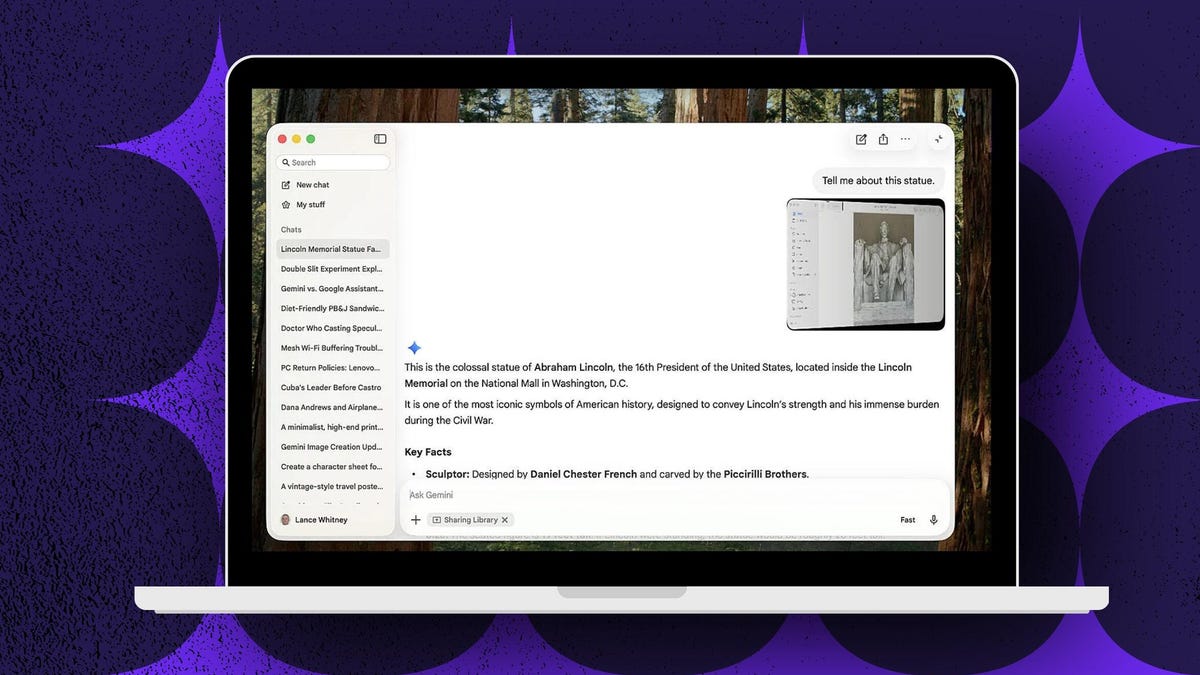
I’ve tested every major AI desktop app in 2026, and here’s the truth most people are missing. The Gemini Mac app isn’t just a shortcut to the website. It lets you point it at any open window on your screen and get instant analysis, no copying, no pasting, no wasted time. That one feature changes everything.
Why This Matters Right Now
Google launched the Gemini Mac app on April 15, 2026, according to TechRadar. It requires macOS Sequoia 15.0 or higher and Apple Silicon under the hood. The app drops into your menu bar and your Dock, and it’s free for every Gemini user.
According to AppleInsider, the design is intentionally lightweight, built for quick access rather than deep system hooks like Siri. You get two keyboard shortcuts out of the box. Option + Space opens a mini chat popup. Option + Shift + Space opens the full chat window. That’s it. Simple and fast.
This app enters a crowded fight. Claude and ChatGPT both have native Mac apps on the App Store already, according to TechRadar. Google is arriving third to this particular party. But they may have brought the best gift.
The Real Edge Nobody Is Talking About
Here’s my honest take. Most people will download this app and use it exactly like they used the website. They’ll type questions. They’ll paste text. They’ll get answers. And they’ll think they got the upgrade.
They didn’t.
The actual power move is window sharing. Go to “Add files and tools,” select “Share window,” pick any open app on your Mac, and Gemini reads whatever is on that screen. A spreadsheet. A PDF. A block of code in your IDE. A contract. A dashboard. Gemini sees it and talks about it.
You don’t copy a single word. You don’t paste anything. You just point and ask.
I think most people underestimate how much time they burn on copy-paste workflows. It sounds small. It isn’t. It breaks your focus every single time. Robert Cialdini spent years studying how interruptions kill output. Every time you stop to select, copy, switch tabs, and paste, you pay a mental tax. The Gemini Mac app eliminates that tax for AI interactions.
The finance use case is obvious and underrated. Imagine you’re an analyst staring at a 60-page compliance document in Preview. Instead of highlighting paragraphs and dumping them into a chat window, you share the window and ask Gemini to flag anything that looks like a liability. Done in seconds. According to YouTube demos highlighted by Google, the pop-up chat stays non-intrusive and doesn’t hijack your workflow.
Developers win here too. Share your code editor window and ask why a function is throwing errors. No more creating a new chat and manually pasting 200 lines of code. The context is already there.
I’d also point out the business angle for content creators. If you film yourself working through an analysis and want to turn it into a polished explainer, InVideo AI video creation lets you build a professional video from a script or raw footage fast. The Gemini app can help you write the script by reading your own notes right off the screen. Those two tools together compress hours of work into minutes.
Now here’s my contrarian point. Google is third in the native Mac app race, but window sharing gives them a functional lead over pasted-text workflows that both Claude and ChatGPT still rely on heavily, according to TechRadar’s April 2026 coverage. Being third to ship doesn’t mean being third in usefulness. The feature set matters more than the launch date.
The free model is also a serious strategic move. No paid subscription is required for the core app, according to Google’s own product documentation. Pro and Ultra tiers advanced image and video generation, but the window sharing feature, the one that actually changes daily behavior, is free. That’s how you win market share fast.
What This Means For You
Here’s what I would do if I were starting fresh with this app today.
First, download it and skip past the basic chat features. Go straight to Privacy and Security in your Mac settings and grant Accessibility permissions. That s the window sharing. Without it, you’ve got a slightly faster version of the website. With it, you’ve got something genuinely different.
Second, build the keyboard shortcut into muscle memory. Option + Space for quick questions. Option + Shift + Space when you need the full interface. Practice it for three days and it becomes automatic.
Third, think about your highest-friction daily tasks. What do you spend the most time reading, analyzing, or summarizing? Start using window sharing for exactly that. Don’t try to use it for everything at once. Pick one workflow and drill down on it.
For anyone managing a team or running a small business, the compliance and document review angle is worth testing immediately. Share a vendor contract, ask Gemini to list every clause that carries a penalty or deadline, and review the output. That’s a workflow that used to require a paralegal or a very long afternoon.
If you’re building out a software stack for your team, AppSumo lifetime software deals often surface tools that pair well with AI workflows. It’s worth checking what’s available there before you commit to annual subscriptions for every productivity tool on your list.
Finally, don’t sleep on the shortcut bar access even when you don’t need window sharing. The speed of popping open a mini chat without touching your browser is genuinely useful for quick questions during deep work sessions.
The Bottom Line
Google showed up third to the native Mac AI app race and still managed to build the most practical daily feature: point at a window, get an answer, never break your flow. The browser version is fine. The app is better. Window sharing alone justifies the download. Every analyst, developer, and operator working on a Mac should already have this installed. The AI tools that remove friction win. This one removes a lot of it.
Frequently Asked Questions
What is the Gemini Mac app and when did it launch?
The Gemini Mac app is Google’s native macOS application for accessing Gemini AI directly from your desktop. It launched on April 15, 2026, according to TechRadar, and requires macOS Sequoia 15.0 or later on Apple Silicon hardware.
How does window sharing work in the Gemini Mac app?
You open the Gemini app, click “Add files and tools,” and select “Share window.” You then choose any open window on your Mac, and Gemini can read and analyze its contents without you copying or pasting any text. You’ll need to grant Accessibility permissions in macOS Privacy and Security settings first.
Is the Gemini Mac app free to use?
Yes, the core app is free for all Gemini users, according to Google’s product documentation. Pro and Ultra subscription tiers advanced features like image and video generation, but window sharing and the standard chat features cost nothing.
How does the Gemini Mac app compare to Claude and ChatGPT on Mac?
All three apps offer native Mac experiences with quick-access shortcuts, according to TechRadar’s April 2026 coverage. Gemini’s window sharing feature gives it a practical edge for users who want to analyze on-screen content without manually copying text into the chat.
What keyboard shortcuts does the Gemini Mac app use?
Option + Space opens a mini chat popup for quick questions. Option + Shift + Space opens the full Gemini chat window. Both shortcuts work from anywhere on your Mac without switching apps first.
“`
Get stories like this in your inbox. Daily.
Free. No spam. The AI, tech, and finance stories that move money.