OpenAI shipped a physical AI keypad in 2026 and most people have no idea what to do with it. Developers who live in the terminal will get it immediately. Everyone else will spend $199 on a very expensive paperweight. That gap between those two groups tells you exactly where AI hardware is headed and who stands to win.
What This Device Actually Does
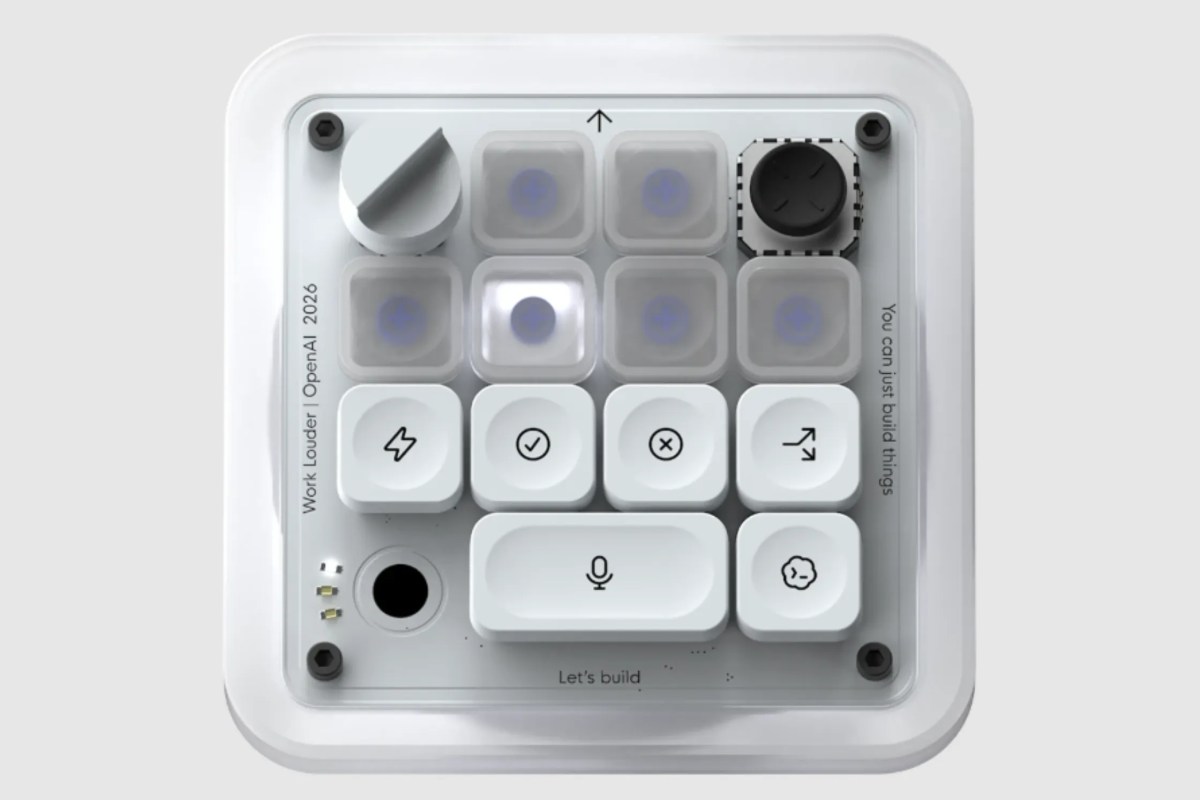
OpenAI released a dedicated input device built around its o-series models. Think of it as a programmable keypad where every key triggers a different AI action. Summarize a function. Generate a unit test. Refactor a loop. You press one physical key and the action fires, without switching apps, opening a chat window, or typing a single prompt.
According to OpenAI’s product documentation, the keypad connects via USB-C and Bluetooth. It runs locally cached commands so there’s no latency hit on basic functions. Cloud-connected features require an active ChatGPT Plus or Pro subscription. The device ships with 16 programmable keys and a rotary dial for adjusting output parameters like response length and randomness in real time.
According to Stack Overflow’s 2025 Developer Survey, 82% of professional developers now use AI coding tools daily. That number sat at 49% in 2023. The market for AI-assisted development tools hit $4.2 billion in 2025, according to Grand View Research, with projections to reach $9.7 billion by 2028. OpenAI is not releasing a gadget. It’s making a physical claim on the fastest-growing segment of the software market.
The Real Play Nobody Is Talking About
Tech journalists are covering this like a novelty. It’s not.
OpenAI isn’t selling a keypad. It’s selling lock-in through muscle memory. If your hands learn to reach for an OpenAI device every time you want to run an AI action, you’re not switching to Anthropic or Google next year. Your fingers already know where the keys are. That’s a moat that has nothing to do with model quality.
Apple pulled this same move with the Touch Bar. Most people dismissed it. Then developers built habits around it. Physical tools create physical routines and routines are hard to break.
The weak move is to laugh at this device and keep copy-pasting prompts into a browser tab. The smart move is to recognize that whoever builds physical habits around AI first earns a hard-to-replicate edge in daily output. Speed compounds. A developer who runs AI actions three seconds faster than their peers, hundreds of times a day, ships more than them every single week.
If you write code and produce content alongside it, stacking a tool like InVideo AI on top of this kind of workflow makes sense. You can turn a quick code demo into a polished explainer video in minutes, exactly the kind of output a faster developer can ship consistently without burning extra hours.
What This Means for You
I want to be direct. If you write code professionally, this device is worth a serious look. Not because the AI is better than what’s inside your IDE. It isn’t. GitHub Copilot and Claude Code both have deeper context awareness. The keypad’s value is speed of intent. You think of an action, you press a key, it happens. No typing, no modal windows, no mental gear shift.
According to a 2025 study by the University of Michigan’s Human-Computer Interaction Lab, context switching costs developers an average of 23 minutes of regained focus per interruption. A device that eliminates even three prompt-typing interruptions per hour adds up fast over a 40-hour work week. That’s not a rounding error. That’s a meaningful output difference.
Here is what I would actually do if I were evaluating this purchase. Map out the five AI actions you run most often during a coding session. If four of them can be reduced to a single keypress, the math works in your favor. If you’re mostly using AI for open-ended brainstorming and long-form chat, a keypad is the wrong tool. Spend the money on a better prompt library instead.
For non-coders who want more from AI without the hardware learning curve, your money moves further on software. AppSumo regularly lists lifetime deals on AI productivity tools that will do more for most general workflows than this keypad will. Lower cost, faster setup, and the ROI is clearer within the first week.
The honest verdict on the hardware itself: this is version one. It’s good. It’s not polished. The programmable key layout takes a few hours to configure properly and the documentation assumes you already understand how OpenAI’s API parameters work. If that sentence made your eyes glaze over, this device isn’t for you yet.
The Bottom Line
OpenAI built something real. It’s narrow, technical, and aimed directly at people who already spend eight hours a day in a code editor. For that group, the keypad will pay for itself inside a month. For everyone else, this is a preview of where human-computer interaction is heading: physical, specialized, and deeply tied to one AI provider’s stack. The race to own your hands has started. Most people aren’t paying attention yet.
Frequently Asked Questions
What is the OpenAI AI keypad?
It’s a programmable physical input device built around OpenAI’s models. Each key can trigger a different AI action like code generation, refactoring, or summarization without switching apps or typing a prompt. It connects via USB-C and Bluetooth and requires a ChatGPT subscription for cloud features.
Is the OpenAI AI keypad worth buying if you’re not a developer?
Probably not at this stage. The device is designed with coders in mind and requires meaningful setup time to configure properly. Most non-developers will get faster returns from software-based AI tools at a lower price point.
How does the OpenAI AI keypad compare to AI tools built into VS Code or Cursor?
IDE integrations have deeper code context than the keypad does. The keypad’s advantage is raw speed: one physical press instead of typing, clicking, or switching windows. It works best as a shortcut layer on top of the AI tools you already use, not a replacement for them.
Does the OpenAI AI keypad work without an internet connection?
Locally cached commands work offline. Advanced AI-generated outputs require a live connection and an active OpenAI subscription. According to OpenAI’s product page, offline mode covers roughly 30% of the most common developer actions.
What does the OpenAI AI keypad cost?
The device retails at $199. Full functionality requires a ChatGPT Plus subscription at $20 per month or a Pro subscription at $200 per month, according to OpenAI’s current pricing page. Factor in the subscription cost when calculating whether the productivity gain justifies the spend.